> ## Documentation Index
> Fetch the complete documentation index at: https://basecamp.mintlify.site/llms.txt
> Use this file to discover all available pages before exploring further.
# Airstack API Integration
> Airstack API と連携してみよう
今回のレッスンは **Lesson 1** のソースコードをベースにプログラミングするため、`lesson-02` ディレクトリ(自分自身がわかるディレクトリ名ならばなんでも可)を作成し、**Lesson 1** のディレクトリから `.git`, `.next`, `node_modules` 以外のファイルを複製してレッスンを進めます。
**Lesson 1** のソースコードを複製した場合は、作業を進める前に `cd` コマンドで **Lesson 2** のディレクトリに移動したうえで、必ず以下のコマンドを実行してください。
```bash theme={null}
npm install
```
今回のレッスンで作成する最終的なソースコードを確認したい場合は、ページの最後の [最終的なソースコード](#12) から GitHub リポジトリにアクセスしてソースコードをダウンロードしてください。
## 1. Airstack Node SDK のインストール
まず最初に、**Airstack API** との統合を始めるために **Airstack Node SDK** のインストールが必要なため、以下のコマンドで必要なパッケージのインストールを行います。
```bash theme={null}
npm install @airstack/node
```
## 2. ローカル環境変数に API キーを追加
次に、Airstack API に必要な API キーの設定を行っていきます。
ただし、API キーは漏洩すると悪用される恐れがあるため、API キーの値を直接プログラムのソースコードに記述することは望ましくありません。
そのため、[Airstack API キーの取得](api-key) で取得した API キーをプログラム側からを利用可能にするためにローカル環境変数のファイルを用意し、そのファイル内に API キーの値を保存します。
具体的には、プロジェクトのディレクトリ直下に `.env.local` ファイルを作成し、その中に `AIRSTACK_API_KEY={your_api_key}` と記述し、保存します。
これにより、プログラム側から `process.env.AIRSTACK_API_KEY` と呼び出すことにより、その値を読み取ることが可能になります。
## 2. 変数 frames の外部ファイル化とエクスポート
API 連携を実装する際に `createFrames` 関数内でミドルウェアとして **Airstack Hubs** を設定する必要がありますが、メンテナンス性を考慮した場合、変数 `frames` を外部ファイル化して使いまわすほうが効率的なため、変数 `frames` を外部ファイル化します。
1. `/app/frames` ディレクトリ直下に `frames.tsx` ファイルを作成します。
2. `/app/frames/frames.tsx` ファイル内に `/app/frames/route.tsx` ファイル内の以下の部分をコピー&ペーストします。
```typescript /app/frames/route.tsx {5-17} theme={null}
import { farcasterHubContext } from "frames.js/middleware";
import { createFrames, Button } from "frames.js/next";
import { appURL } from "app/utils";
const frames = createFrames({
basePath: "/frames",
middleware: [
farcasterHubContext({
// remove if you aren't using @frames.js/debugger or you just don't want to use the debugger hub
...(process.env.NODE_ENV === "production"
? {}
: {
hubHttpUrl: "http://localhost:3010/hub",
}),
}),
],
});
const handleRequest = frames(async (ctx) => {
return {
image: `${appURL()}/01.png`, // http://localhost:3000/01.png
buttons: [
,
],
};
});
export const GET = handleRequest;
export const POST = handleRequest;
```
3. 変数 `frames` を他のファイルからインポートできるように、このファイルに必要なファイルをインポートしつつ、変数を `export` します。
```typescript /app/frames/frames.tsx {1-2, 4} theme={null}
import { farcasterHubContext } from "frames.js/middleware";
import { createFrames } from "frames.js/next";
export const frames = createFrames({
basePath: "/frames",
middleware: [
farcasterHubContext({
// remove if you aren't using @frames.js/debugger or you just don't want to use the debugger hub
...(process.env.NODE_ENV === "production"
? {}
: {
hubHttpUrl: "http://localhost:3010/hub",
}),
}),
],
});
```
## 3. Airstack Hubs の設定とローカル環境変数のロード
変数 `frames` の外部ファイル化が終わったら、`createFrames` 関数のミドルウェアとして `https://hubs.airstack.xyz` を設定し、ローカル環境変数から API キーの値を設定します。
```typescript /app/frames/frames.tsx {10-15} theme={null}
import { farcasterHubContext } from "frames.js/middleware";
import { createFrames } from "frames.js/next";
export const frames = createFrames({
basePath: "/frames",
middleware: [
farcasterHubContext({
...(process.env.NODE_ENV === "production"
? {
hubHttpUrl: "https://hubs.airstack.xyz",
hubRequestOptions: {
headers: {
"x-airstack-hubs": process.env.AIRSTACK_API_KEY as string,
},
},
}
: {
hubHttpUrl: "http://localhost:3010/hub",
}),
}),
],
});
```
## 4. 変数 frames の削除とインポート
変数 `frames` を外部からインポートする場合、元々記述してあった変数 `frames` をそのままにしておくと、同じ変数名が存在するコンフリクトの状態になりエラーが発生するため、インポート文を追記しつつ、元々記述してあった変数 `frames` のコードを削除します。
```typescript /app/frames/route.tsx {3, 6-19} theme={null}
import { farcasterHubContext } from "frames.js/middleware";
import { createFrames, Button } from "frames.js/next";
import { frames } from "app/frames/frames"; // 追記
import { appURL } from "app/utils";
// 削除
const frames = createFrames({
basePath: "/frames",
middleware: [
farcasterHubContext({
// remove if you aren't using @frames.js/debugger or you just don't want to use the debugger hub
...(process.env.NODE_ENV === "production"
? {}
: {
hubHttpUrl: "http://localhost:3010/hub",
}),
}),
],
});
const handleRequest = frames(async (ctx) => {
return {
image: `${appURL()}/01.png`,
buttons: [
,
],
};
});
export const GET = handleRequest;
export const POST = handleRequest;
```
## 5. 不要なインポートの削除
`createFrames` によって生成された変数 `frames` を削除すると、`createFrames` 関数と `farcasterHubContext` 関数のインポートが不要になる(使われていないインポートは文字がグレーアウトする)ため、それらの不必要な記述を削除しコードを見やすくします。
### コード修正前
```typescript /app/frames/route.tsx {1-2} theme={null}
import { farcasterHubContext } from "frames.js/middleware";
import { createFrames, Button } from "frames.js/next";
import { frames } from "app/frames/frames";
import { appURL } from "app/utils";
const handleRequest = frames(async (ctx) => {
return {
image: `${appURL()}/01.png`,
buttons: [
,
],
};
});
export const GET = handleRequest;
export const POST = handleRequest;
```
### コード修正後
```typescript /app/frames/route.tsx theme={null}
import { Button } from "frames.js/next";
import { frames } from "app/frames/frames";
import { appURL } from "app/utils";
const handleRequest = frames(async (ctx) => {
return {
image: `${appURL()}/01.png`,
buttons: [
,
],
};
});
export const GET = handleRequest;
export const POST = handleRequest;
```
## 6. API エンドポイントの実装
API に接続するための準備ができたら API エンドポイントを実装していきます。
まず、API エンドポイントとして、`app` ディレクトリ直下に `api` ディレクトリを作成し、ディレクトリ内に `route.tsx` ファイルを作成します。
ファイルを作成したら、以下のソースコードをコピー&ペーストします。
```typescript /app/api/route.tsx theme={null}
import { init, fetchQuery } from "@airstack/node";
import { type NextRequest, NextResponse } from "next/server";
const apiKey = process.env.AIRSTACK_API_KEY;
if (!apiKey) {
throw new Error("AIRSTACK_API_KEY is not defined");
}
init(apiKey);
const userDataQuery = ``;
```
## 7. クエリのテストと変数の定義
次に、**Airstack API** から取得するデータのテストを行うために以下の URL にアクセスします。
[https://app.airstack.xyz/api-studio](https://app.airstack.xyz/api-studio)
今回はテストとしてユーザーの基本的な情報を取得して値を確認したいため、以下のように取得したいデータに必要な項目を選択し、画面右側にある **赤に右三角** のボタンをクリックします。
選択項目や **FID** の値に間違いがなければ **Airstack API** からのレスポンスとして右側に入力した **FID** と選択項目に応じた値が表示されるはずです。
```
Socials > input > blockchanin*: ethereum
Socials > input > filter*: > userId: _eq: {your_fid}
Socials > Social > userId, profileName, profileDisplayName, profileBio, profileImage, followerCount, followingCount
```
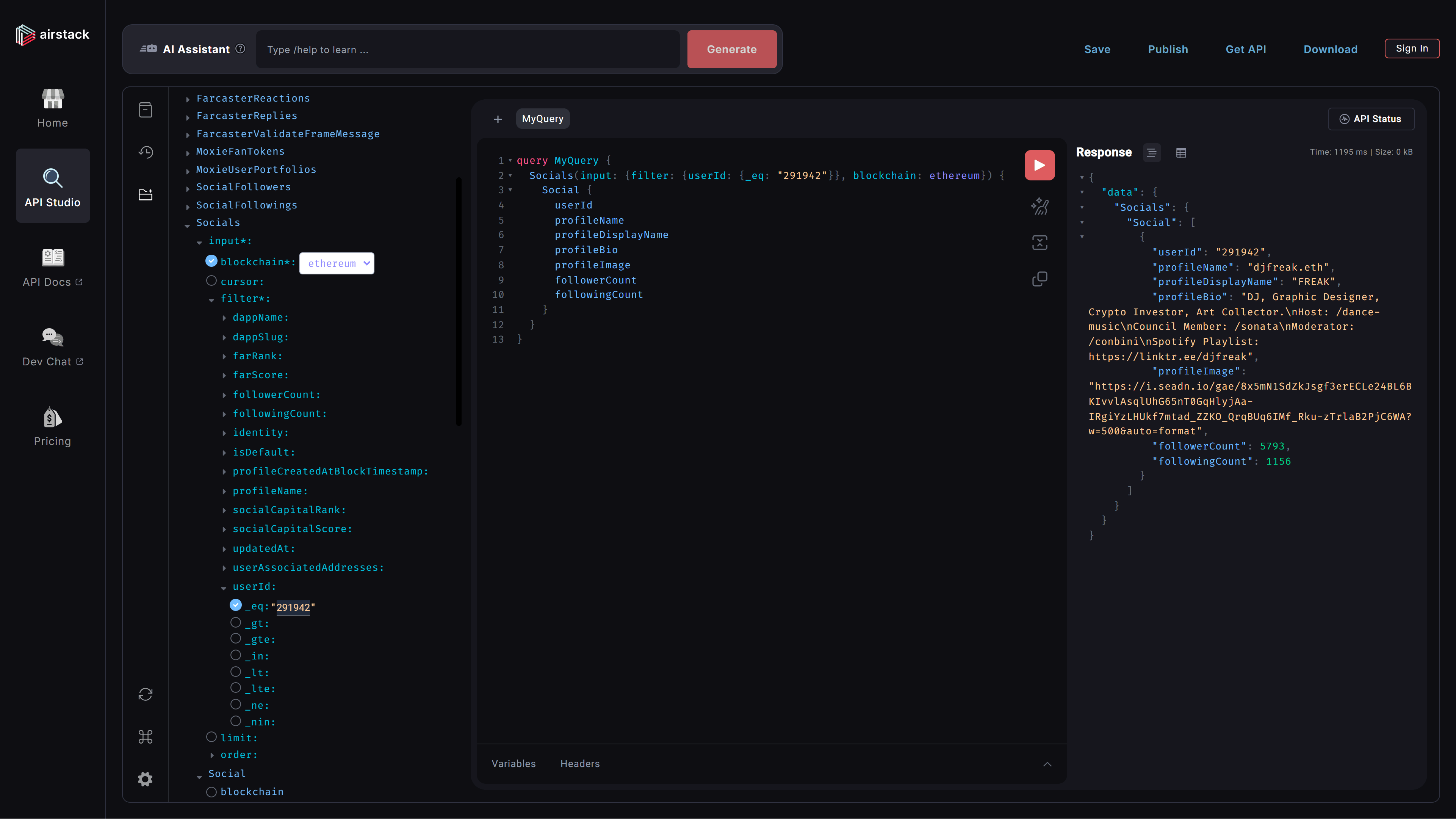 テストが問題なく行えたら、API エンドポイントで実行する **GraphQL** クエリを `userDataQuery` 変数として定義します。
```typescript /app/api/route.tsx {11-23} theme={null}
import { init, fetchQuery } from "@airstack/node";
import { type NextRequest, NextResponse } from "next/server";
const apiKey = process.env.AIRSTACK_API_KEY;
if (!apiKey) {
throw new Error("AIRSTACK_API_KEY is not defined");
}
init(apiKey);
const userDataQuery = `
query MyQuery {
Socials(input: {filter: {userId: {_eq: "入力したFID"}}, blockchain: ethereum}) {
Social {
userId
profileName
profileDisplayName
profileBio
profileImage
followerCount
followingCount
}
}
}
`;
```
このままだと **入力したFID** の値が固定されてしまい、リクエストするユーザーに応じたデータを取得することができないため、以下のようにクエリに少し手を加えます。
```typescript /app/api/route.tsx {11-12} theme={null}
import { init, fetchQuery } from "@airstack/node";
import { type NextRequest, NextResponse } from "next/server";
const apiKey = process.env.AIRSTACK_API_KEY;
if (!apiKey) {
throw new Error("AIRSTACK_API_KEY is not defined");
}
init(apiKey);
const userDataQuery = `
query MyQuery($userId: String!) {
Socials(input: {filter: {userId: {_eq: $userId}}, blockchain: ethereum}) {
Social {
userId
profileName
profileDisplayName
profileBio
profileImage
followerCount
followingCount
}
}
}
`;
```
## 8. クエリの呼び出し
クエリを `userDataQuery` 変数に格納したら、そのクエリを呼び出すために API エンドポイントへアクセス(HTTP GET リクエスト)があった際の処理をするための関数を実装します。
```typescript /app/api/route.tsx {26-46} theme={null}
import { init, fetchQuery } from "@airstack/node";
import { type NextRequest, NextResponse } from "next/server";
const apiKey = process.env.AIRSTACK_API_KEY;
if (!apiKey) {
throw new Error("AIRSTACK_API_KEY is not defined");
}
init(apiKey);
const userDataQuery = `
query MyQuery($userId: String!) {
Socials(input: {filter: {userId: {_eq: $userId}}, blockchain: ethereum}) {
Social {
userId
profileName
profileDisplayName
profileBio
profileImage
followerCount
followingCount
}
}
}
`;
export async function GET(req: NextRequest) {
const userId = req.nextUrl.searchParams.get("userId");
console.log("Requester userId:", userId);
if (!userId) {
console.log("Error: userId parameter is missing");
return NextResponse.json({ error: "userId parameter is required" }, { status: 400 });
}
try {
const [response] = await Promise.all([fetchQuery(userDataQuery, { userId })]);
if (response.error) {
console.error("Airstack API Error (User Data):", response.error);
return NextResponse.json({ error: response.error.message }, { status: 500 });
}
console.log("userData: %o", response.data);
return NextResponse.json({
userData: response.data,
});
} catch (error) {
return NextResponse.json({ error: "An unexpected error occurred" }, { status: 500 });
}
}
```
## 9. API エンドポイントからデータ取得するための関数と変数を定義
API エンドポイントの実装が終わったら、今度はそれを呼び出す関数と変数を定義する必要があります。
今回のレッスンでは、フレームの最初のページから次のページへ遷移するためのボタンがクリックされたタイミングで API エンドポイントへのリクエストを行うため、`/app/frames/next/route.tsx` に関数を定義します。
```typescript /app/frames/next/route.tsx {6-22} theme={null}
import { Button } from "frames.js/next";
import { frames } from "app/frames/frames";
import { appURL } from "app/utils";
const handleRequest = frames(async (ctx) => {
let error: string | null = null;
let isLoading = false;
const fetchUserData = async (fid: string) => {
isLoading = true;
try {
const airstackUrl = `${appURL()}/api?userId=${encodeURIComponent(fid)}`;
const airstackResponse = await fetch(airstackUrl);
if (!airstackResponse.ok) {
throw new Error(`Airstack HTTP error! status: ${airstackResponse.status}`);
}
} catch (err) {
console.error("Error fetching data:", err);
error = (err as Error).message;
} finally {
isLoading = false;
}
};
return {
image: `${appURL()}/02.png`,
buttons: [
,
],
};
});
export const GET = handleRequest;
export const POST = handleRequest;
```
## 10. リクエストユーザーの fid を取得
次に、`fetchUserData` でユーザーデータを取得する際に必要なリクエストユーザーの `fid` を取得するための処理を追加します。
```typescript /app/frames/next/route.tsx {24-31} theme={null}
import { Button } from "frames.js/next";
import { frames } from "app/frames/frames";
import { appURL } from "app/utils";
const handleRequest = frames(async (ctx) => {
let error: string | null = null;
let isLoading = false;
const fetchUserData = async (fid: string) => {
isLoading = true;
try {
const airstackUrl = `${appURL()}/api?userId=${encodeURIComponent(fid)}`;
const airstackResponse = await fetch(airstackUrl);
if (!airstackResponse.ok) {
throw new Error(`Airstack HTTP error! status: ${airstackResponse.status}`);
}
} catch (err) {
console.error("Error fetching data:", err);
error = (err as Error).message;
} finally {
isLoading = false;
}
};
let fid: string | null = null;
if (ctx.message?.requesterFid) {
fid = ctx.message.requesterFid.toString();
console.log("Using requester FID:", fid);
} else {
console.log("No ctx.url available");
}
console.log("Final FID used:", fid);
return {
image: `${appURL()}/02.png`,
buttons: [
,
],
};
});
export const GET = handleRequest;
export const POST = handleRequest;
```
## 11. 取得した fid をもとに処理を実行
最後に、`fid` が値として存在する場合に実行する処理を追加します。
```typescript /app/frames/next/route.tsx {33-35} theme={null}
import { Button } from "frames.js/next";
import { frames } from "app/frames/frames";
import { appURL } from "app/utils";
const handleRequest = frames(async (ctx) => {
let error: string | null = null;
let isLoading = false;
const fetchUserData = async (fid: string) => {
isLoading = true;
try {
const airstackUrl = `${appURL()}/api?userId=${encodeURIComponent(fid)}`;
const airstackResponse = await fetch(airstackUrl);
if (!airstackResponse.ok) {
throw new Error(`Airstack HTTP error! status: ${airstackResponse.status}`);
}
} catch (err) {
console.error("Error fetching data:", err);
error = (err as Error).message;
} finally {
isLoading = false;
}
};
let fid: string | null = null;
if (ctx.message?.requesterFid) {
fid = ctx.message.requesterFid.toString();
console.log("Using requester FID:", fid);
} else {
console.log("No ctx.url available");
}
console.log("Final FID used:", fid);
if (fid) {
await Promise.all([fetchUserData(fid)]);
}
return {
image: `${appURL()}/02.png`,
buttons: [
,
],
};
});
export const GET = handleRequest;
export const POST = handleRequest;
```
処理が問題なく実行された場合、以下のようなログがターミナルに表示されます。
```bash theme={null}
userData: {
Socials: {
Social: [
{
userId: '291942',
profileName: 'djfreak.eth',
profileDisplayName: 'FREAK',
profileBio: 'DJ, Graphic Designer, Crypto Investor, Art Collector.\n' +
'Host: /dance-music\n' +
'Council Member: /sonata\n' +
'Moderator: /conbini\n' +
'Spotify Playlist: https://linktr.ee/djfreak',
profileImage: 'https://i.seadn.io/gae/N1SdZkJsgf3erECLe24BL6BKIvvlAsqlUhG65nT0GqHlyjAa-IRgiYzLHUkf7mtad_ZZKO_QrqBUq6IMf_Rku-zTrlaB2PjC6WA?w=500&auto=format',
followerCount: 5793,
followingCount: 1156
},
[length]: 1
]
}
}
```
## 12. 最終的なソースコード
GitHub Repository: Lesson 2
テストが問題なく行えたら、API エンドポイントで実行する **GraphQL** クエリを `userDataQuery` 変数として定義します。
```typescript /app/api/route.tsx {11-23} theme={null}
import { init, fetchQuery } from "@airstack/node";
import { type NextRequest, NextResponse } from "next/server";
const apiKey = process.env.AIRSTACK_API_KEY;
if (!apiKey) {
throw new Error("AIRSTACK_API_KEY is not defined");
}
init(apiKey);
const userDataQuery = `
query MyQuery {
Socials(input: {filter: {userId: {_eq: "入力したFID"}}, blockchain: ethereum}) {
Social {
userId
profileName
profileDisplayName
profileBio
profileImage
followerCount
followingCount
}
}
}
`;
```
このままだと **入力したFID** の値が固定されてしまい、リクエストするユーザーに応じたデータを取得することができないため、以下のようにクエリに少し手を加えます。
```typescript /app/api/route.tsx {11-12} theme={null}
import { init, fetchQuery } from "@airstack/node";
import { type NextRequest, NextResponse } from "next/server";
const apiKey = process.env.AIRSTACK_API_KEY;
if (!apiKey) {
throw new Error("AIRSTACK_API_KEY is not defined");
}
init(apiKey);
const userDataQuery = `
query MyQuery($userId: String!) {
Socials(input: {filter: {userId: {_eq: $userId}}, blockchain: ethereum}) {
Social {
userId
profileName
profileDisplayName
profileBio
profileImage
followerCount
followingCount
}
}
}
`;
```
## 8. クエリの呼び出し
クエリを `userDataQuery` 変数に格納したら、そのクエリを呼び出すために API エンドポイントへアクセス(HTTP GET リクエスト)があった際の処理をするための関数を実装します。
```typescript /app/api/route.tsx {26-46} theme={null}
import { init, fetchQuery } from "@airstack/node";
import { type NextRequest, NextResponse } from "next/server";
const apiKey = process.env.AIRSTACK_API_KEY;
if (!apiKey) {
throw new Error("AIRSTACK_API_KEY is not defined");
}
init(apiKey);
const userDataQuery = `
query MyQuery($userId: String!) {
Socials(input: {filter: {userId: {_eq: $userId}}, blockchain: ethereum}) {
Social {
userId
profileName
profileDisplayName
profileBio
profileImage
followerCount
followingCount
}
}
}
`;
export async function GET(req: NextRequest) {
const userId = req.nextUrl.searchParams.get("userId");
console.log("Requester userId:", userId);
if (!userId) {
console.log("Error: userId parameter is missing");
return NextResponse.json({ error: "userId parameter is required" }, { status: 400 });
}
try {
const [response] = await Promise.all([fetchQuery(userDataQuery, { userId })]);
if (response.error) {
console.error("Airstack API Error (User Data):", response.error);
return NextResponse.json({ error: response.error.message }, { status: 500 });
}
console.log("userData: %o", response.data);
return NextResponse.json({
userData: response.data,
});
} catch (error) {
return NextResponse.json({ error: "An unexpected error occurred" }, { status: 500 });
}
}
```
## 9. API エンドポイントからデータ取得するための関数と変数を定義
API エンドポイントの実装が終わったら、今度はそれを呼び出す関数と変数を定義する必要があります。
今回のレッスンでは、フレームの最初のページから次のページへ遷移するためのボタンがクリックされたタイミングで API エンドポイントへのリクエストを行うため、`/app/frames/next/route.tsx` に関数を定義します。
```typescript /app/frames/next/route.tsx {6-22} theme={null}
import { Button } from "frames.js/next";
import { frames } from "app/frames/frames";
import { appURL } from "app/utils";
const handleRequest = frames(async (ctx) => {
let error: string | null = null;
let isLoading = false;
const fetchUserData = async (fid: string) => {
isLoading = true;
try {
const airstackUrl = `${appURL()}/api?userId=${encodeURIComponent(fid)}`;
const airstackResponse = await fetch(airstackUrl);
if (!airstackResponse.ok) {
throw new Error(`Airstack HTTP error! status: ${airstackResponse.status}`);
}
} catch (err) {
console.error("Error fetching data:", err);
error = (err as Error).message;
} finally {
isLoading = false;
}
};
return {
image: `${appURL()}/02.png`,
buttons: [
,
],
};
});
export const GET = handleRequest;
export const POST = handleRequest;
```
## 10. リクエストユーザーの fid を取得
次に、`fetchUserData` でユーザーデータを取得する際に必要なリクエストユーザーの `fid` を取得するための処理を追加します。
```typescript /app/frames/next/route.tsx {24-31} theme={null}
import { Button } from "frames.js/next";
import { frames } from "app/frames/frames";
import { appURL } from "app/utils";
const handleRequest = frames(async (ctx) => {
let error: string | null = null;
let isLoading = false;
const fetchUserData = async (fid: string) => {
isLoading = true;
try {
const airstackUrl = `${appURL()}/api?userId=${encodeURIComponent(fid)}`;
const airstackResponse = await fetch(airstackUrl);
if (!airstackResponse.ok) {
throw new Error(`Airstack HTTP error! status: ${airstackResponse.status}`);
}
} catch (err) {
console.error("Error fetching data:", err);
error = (err as Error).message;
} finally {
isLoading = false;
}
};
let fid: string | null = null;
if (ctx.message?.requesterFid) {
fid = ctx.message.requesterFid.toString();
console.log("Using requester FID:", fid);
} else {
console.log("No ctx.url available");
}
console.log("Final FID used:", fid);
return {
image: `${appURL()}/02.png`,
buttons: [
,
],
};
});
export const GET = handleRequest;
export const POST = handleRequest;
```
## 11. 取得した fid をもとに処理を実行
最後に、`fid` が値として存在する場合に実行する処理を追加します。
```typescript /app/frames/next/route.tsx {33-35} theme={null}
import { Button } from "frames.js/next";
import { frames } from "app/frames/frames";
import { appURL } from "app/utils";
const handleRequest = frames(async (ctx) => {
let error: string | null = null;
let isLoading = false;
const fetchUserData = async (fid: string) => {
isLoading = true;
try {
const airstackUrl = `${appURL()}/api?userId=${encodeURIComponent(fid)}`;
const airstackResponse = await fetch(airstackUrl);
if (!airstackResponse.ok) {
throw new Error(`Airstack HTTP error! status: ${airstackResponse.status}`);
}
} catch (err) {
console.error("Error fetching data:", err);
error = (err as Error).message;
} finally {
isLoading = false;
}
};
let fid: string | null = null;
if (ctx.message?.requesterFid) {
fid = ctx.message.requesterFid.toString();
console.log("Using requester FID:", fid);
} else {
console.log("No ctx.url available");
}
console.log("Final FID used:", fid);
if (fid) {
await Promise.all([fetchUserData(fid)]);
}
return {
image: `${appURL()}/02.png`,
buttons: [
,
],
};
});
export const GET = handleRequest;
export const POST = handleRequest;
```
処理が問題なく実行された場合、以下のようなログがターミナルに表示されます。
```bash theme={null}
userData: {
Socials: {
Social: [
{
userId: '291942',
profileName: 'djfreak.eth',
profileDisplayName: 'FREAK',
profileBio: 'DJ, Graphic Designer, Crypto Investor, Art Collector.\n' +
'Host: /dance-music\n' +
'Council Member: /sonata\n' +
'Moderator: /conbini\n' +
'Spotify Playlist: https://linktr.ee/djfreak',
profileImage: 'https://i.seadn.io/gae/N1SdZkJsgf3erECLe24BL6BKIvvlAsqlUhG65nT0GqHlyjAa-IRgiYzLHUkf7mtad_ZZKO_QrqBUq6IMf_Rku-zTrlaB2PjC6WA?w=500&auto=format',
followerCount: 5793,
followingCount: 1156
},
[length]: 1
]
}
}
```
## 12. 最終的なソースコード
GitHub Repository: Lesson 2